AI Follow-up Calls in FreedomSoft allow you to automatically place AI-powered follow-up calls to leads using a Follow-up Voice Agent through Workflow Automation.
This feature helps you stay engaged with leads automatically while ensuring consistent communication and faster follow-up throughout your sales process.
Note: This guide focuses specifically on configuring AI Follow-up Calls inside Workflow Automation. Before proceeding, you must first create a Follow-up Voice Agent.
Before You Begin
Before setting up AI Follow-up Calls, make sure:
- You have already created a Lead Follow-up Voice Agent (click here for instructions)
- The campaign is attached to the Workflow Automation you are configuring (click here for workflow automation set up instructions)
- The campaign has a phone number assigned to it (click here for instructions)
Once configured, the Follow-up agent will automatically place calls for any campaign connected to the workflow containing the AI Voice Call action.
Accessing Workflow Automation Settings
To begin, navigate to the Workflow Automation section in FreedomSoft.
- Click the dropdown next to your name in the top navigation
-
Select Settings
- Click Workflow Automation
Opening the Workflow Automation
Locate the Workflow Automation you want the Follow-up Agent to use for making calls.
Click Edit next to the workflow.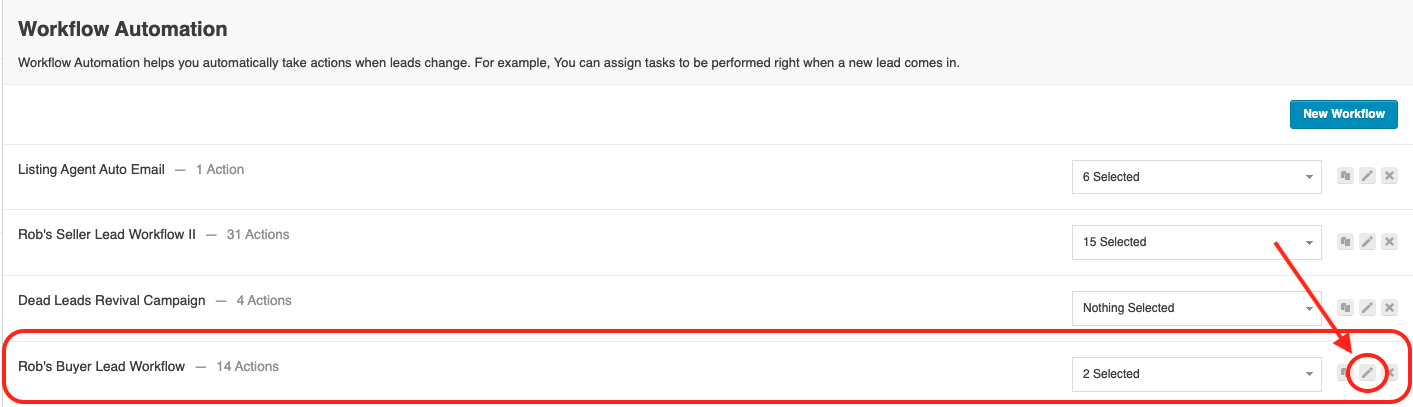
Selecting the Workflow Status
You can either:
- Use an existing workflow status
- Create a new workflow status specifically for AI Follow-up Calls
This status determines when the AI Follow-up Call action will trigger.
Locate the desired workflow status and click Add New Action
then select Add AI Voice Call
Configuring the AI Voice Call
Next, configure the AI Voice Call settings.
You will:
- Select the Follow-up Voice Agent
- Choose which numbers you want the agent to attempt to call
- Choose whether or not to remove DNC numbers
You must check the compliance confirmation box confirming that you have obtained the necessary consent to contact leads using automated communication methods.
- Configure the Delay action
Then click "Add Action" to save these settings in this workflow.
You will now see your added action in the listed in the workflow actions for the status you selected.
Be sure to scroll down and click the blue UPDATE WORKFLOW button to save your changes!
Understanding Automated Calling Timing
Federal and state regulations generally allow outbound calls and text messages to be sent between 8:00 a.m. and 8:00 p.m. in the recipient’s local time zone, though additional restrictions may apply depending on jurisdiction. Because FreedomSoft cannot determine a contact’s real-time physical location when communication is sent, timing compliance must be managed using configurable safeguards.
FreedomSoft provides two timing methods inside your Phone Settings.
1. Time Zone Based (Default Setting)
This option schedules calls and text messages based on your account’s time zone using a standardized compliance window.
When enabled:
- EST → 2:00 p.m. – 8:00 p.m.
- CST → 1:00 p.m. – 7:00 p.m.
- MST → 12:00 p.m. – 6:00 p.m.
- PST → 11:00 a.m. – 5:00 p.m.
- HST → 8:00 a.m. – 2:00 p.m.
This approach helps ensure communication stays within a safe nationwide compliance window.
Why This Matters
This is the lowest-risk timing option because it accounts for all U.S. time zones simultaneously.
However, it also creates the smallest automated sending window.
2. Area Code Based
This option attempts to send calls and messages based on the contact’s phone number area code.
Benefits
- Expands the available sending window
- Allows communication to occur earlier or later depending on the contact’s assumed time zone
**Important Consideration when using Area Code Based Timing:
Some legal interpretations suggest compliance may depend on a person’s actual physical location at the time of contact—not their phone number area code. Because a contact’s real-time location cannot be determined, using area code-based timing introduces additional compliance risk.
For more information on Outbound Calling Compliance click here
Important Compliance & Opt-In Requirements
AI Follow-up Calls will only be made to leads that have been properly confirmed and opted in for communication.
If a lead has not been confirmed, the Follow-up agent will not place calls to that lead.
The confirmation process used for AI Follow-up Calls is the same process used for SMS and Email Broadcast confirmations inside FreedomSoft.
To learn how to confirm and opt in leads, review the article below:
How To Confirm Leads In FreedomSoft For SMS/Text And Email Broadcasts
This confirmation process helps support communication compliance requirements and protects your business from contacting leads without proper consent.
Viewing Follow-up Call Statuses
You can monitor AI Follow-up Call activity inside the Marketing tab under Follow-up.
There are four call status tabs available:
- Pending Calls - Calls waiting to be placed.
- Placed Calls - Calls that have already been completed or attempted.
- Skipped Calls - Calls that were skipped due to workflow conditions or settings.
- Unconfirmed Calls - Leads that have not been properly confirmed or opted in for communication.
From the Unconfirmed Calls tab, you also have the ability to update and confirm leads if needed.
Finalizing Setup
Once the AI Voice Call action has been added to the workflow, AI Follow-up Calls are fully enabled.
Any qualifying lead entering the selected workflow status will automatically receive follow-up calls from your Follow-up Voice Agent, provided:
- The lead is confirmed/opted in
- The campaign has a phone number assigned
- The campaign is attached to the workflow containing the AI Voice Call action
Best Practices
To get the most out of AI Follow-up Calls:
- Ensure your Follow-up Voice Agent is fully configured and tested
- Only contact properly confirmed and opted-in leads
- Use workflow statuses strategically for different follow-up stages
- Test the workflow with sample leads before full deployment
- Monitor Pending, Placed, Skipped, and Unconfirmed Calls regularly
- Carefully review compliance requirements for automated AI communication
Conclusion
AI Follow-up Calls in FreedomSoft allow you to automate ongoing lead communication using AI-powered Voice Agents through Workflow Automation. By combining workflow triggers, automated calling, and confirmation safeguards, you can create a consistent follow-up system that helps improve lead engagement while maintaining compliance requirements.